
A Nifty Tool Added to the Toolkit

You may or may not know I have a thing for maps. I already have quite a few links to mapping tools in Dayna’s Genealogy Toolkit, but I just have to share one I discovered this week while researching at the Family History Library in Salt Lake City. On their computers they have links to useful genealogy websites, and one that I had not known about before is www.mapofus.org.  This very handy mapping tool is being thrown into the toolkit.

Map of US

If you can navigate around all the advertising on the website, and figure out where to find things,  you will find two very useful features:

Interactive boundary formation maps

“Interactive Map of State Formation History” and “Interactive Map of [state] County Formation History” are tools I will be using often. In fact, I used them quite a bit during my research session this week.

If you are familiar with the Animap program by Goldbug, you will recognize these interactive maps.  They are used with the permission of Goldbug, and are basically an online version of Animap without the ability to plot towns. The first shows the state and territorial boundary changes for the entire United States by year.  Access this tool via the “U.S. Maps” link:

Map of US 3

The second shows boundary changes for counties within a given state.  Access this tool via the “Home” link:

Map of US 5

and then clicking on one of the states:

Map of US 6

Historical Atlases

Individual map pages from various historical atlases 1776-1880 have been reproduced here.  Many include details showing railroad lines and the public land survey grid. Access these maps by clicking on the “Historical Atlases” link:

Map of US 4

I like maps for a reason.  Family history puzzlements can often be sorted out when I know what county or state had jurisdiction over an ancestor’s records. It is critical to know where county boundaries were. And how close did they live to a migration route?  Where was the nearest railroad? How close were towns to each other?  Geography can make sense of things, or point out obvious discrepancies in my research.

Just this week I struggled to find records for someone who lived in Jasper County, Missouri and then found it had been part of three other counties. I discovered it by using the interactive county boundary formation map.  I often refer to the “Map Guide to the U.S. Federal Census, 1790-1920,” by William Dollarhide, and I still will because it is my trusty sidekick. But it is nice to have a tool which shows boundaries between the census years, so I will also be using the “Map of US” website.

I would also like to plug Animap software, which has additional worthwhile features.

While “Map of US”is a bit of a funky website with some links that go nowhere and menu items that have nothing under them, you really only need to know where to find the interactive maps and the historical atlases to get the most from the site. I think you will find it quite useful.


 

February 2, 1848: The Treaty of Guadalupe Hidalgo Signed

Churubusco by James Walker 1848 Mexico
“Churubusco” by James Walker, 1848 Mexico

Yes, today is Groundhog Day, but did you know it is also the 158th anniversary of the signing of the Treaty of Guadalupe Hidalgo?  Of course you did!  It is just more fun to have a Groundhog Day party.  I understand.

Having had an ancestor who was wounded in the Mexican War (Thomas Gooch had his finger shot off in the battle of Buena Vista according to his pension record), I am particularly interested in the Treaty of Guadalupe Hidalgo, which ended the war and enlarged the western frontier of the United states.  The Library of Congress website has an excellent guide to the treaty, which gave us the land which became Texas, California, Nevada, Utah, most of Arizona and New Mexico, and parts of Colorado and Wyoming.  One little treaty is all that came between me and Mexican citizenship, as a matter of fact, having had ancestors who settled in 6 out of 8 of those states–some as early as 1847–the year before the treaty was signed.

Ancestry Announces Family Tree Maker Solution

happy-woman-using-computer

Here’s today’s announcement from Ancestry.com–sure to make all the Family Tree Maker users out there happy:

Software MacKiev

Software MacKiev, with whom we have a long-standing relationship, is acquiring the Family Tree Maker software line as publisher for both Mac and Windows versions. Software MacKiev has been the developer of Family Tree Maker for Mac for more than six years and is thrilled at the opportunity to publish future versions of Family Tree Maker for Mac and Windows.

This new agreement means you will receive software updates and new versions from Software MacKiev, and have the ability to purchase new versions of Family Tree Maker from Software MacKiev as they are released. You will have continued access to Ancestry Hints, Ancestry searches, and be able to save your tree on Ancestry with Family Tree Maker moving forward.

RootsMagic

We have made an agreement with RootsMagic, a leading genealogy desktop software program publisher, to connect Ancestry with the RootsMagic software by the end of 2016. With this new relationship, RootsMagic can serve as your desktop family tree software, while having access to Ancestry hints, Ancestry searches, and the ability to save your tree on Ancestry.

We have heard your concerns and are working to provide the solutions you requested. These new agreements will make it possible to preserve your work on Ancestry and Family Tree Maker and enable future features and benefits to help you discover your family history. Be assured that Ancestry, in cooperation with Software MacKiev and RootsMagic, will continue to support you as you discover your family history.

We ask for your patience as we work diligently through all the details to make these solutions available. You can find additional details about these Family Tree Maker partnerships on our blog. We also encourage you to continue to check back on our blog for future updates in the coming months.”

Ding dong, the Witch is Dead

Wicked Witch, Comment

Great news everyone! Ding dong, the Witch is dead!  And I have proof.  Of course, the Fairy Tale Genealogist always has proof.

It’s right there in the probate record for Green W. Witch.  The “W” standing for Wicked, no doubt.

Green Witch probate
Probate Estate Records, Index to Estate Files, 1866-1915, Crenshaw County, Alabama; Author: Alabama. Probate Court (Crenshaw County); Probate Place: Crenshaw, Alabama. Ancestry.com.

Now, the Fairy Tale Genealogist’s earlier research into Snow White revealed the “kingdom” of her childhood was somewhere in Union County, Georgia, so I suppose it should come as no surprise that Oz may very well be found in Crenshaw County, Alabama, according to Ms. Witch’s probate file. The Deep South appears to be a hotbed of fairy tale activity. On the other hand, it is good to keep in mind that probate records are not always filed where the deceased resided, so the legal jurisdiction for Oz may indeed be found Over the Rainbow.

Green W. Witch’s probate file is a good example of just how valuable a probate record can be for a genealogist. It totals 57 pages and has a will, along with sales, petitions, orders, administration papers, and guardianship papers. Kinda makes you want to hop onto Ancestry.com and get into the details of this wicked witch’s life doesn’t it?

Well, if you do you will discover that Green W. Witch was actually one errant indexer’s version of “Green W. Welch,” but the facts never stand in the way of a good story for the Fairy Tale Genealogist!

Life After Family Tree Maker

CaptureOn December 8, 2015 Ancestry announced it would no longer sell Family Tree Maker desktop genealogy software as of December 31, 2015, and would support current owners only until January 1, 2017.  This caused an outcry among FTM users, who are all wondering what to do next. This has also raised questions among genealogy software users, in general, regarding the pros and cons of genealogy software and online trees. Here are some of the issues FTM and genealogy software users are facing, along with possible options going forward:
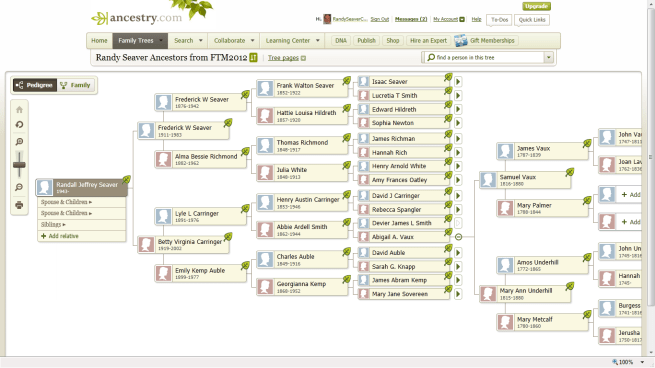
First, there is no need for FTM users to panic or take action immediately.  FTM will continue to be fully functional and supported until January 1, 2017, provided your computer operating system does not have any drastic updates that conflict with it. You have eleven months to consider your options, although other makers of genealogy software are currently offering special deals for FTM users.

FTM issues as of January 2017:

  • FTM will not sync with an online Ancestry Tree.
  • FTM will continue to work, but only as long as your operating system upgrades do not outgrow it.
  • The product will not be supported. No customer service, upgrades, or fixes.

Overall considerations:

  • GEDCOM is the language used by genealogy programs that enables data to be shared between them. A GEDCOM file created in one program can be imported into another program.
  • Exporting files from one genealogy software program to another via GEDCOM will result in the loss of some data, depending on the programs.
  • Some programs will import files from certain other programs directly, without the need for a GEDCOM.
  • If you keep your files only on Ancestry or any other subscription site, you will not have access to it if you cancel your subscription or do not have internet access.
  • Media files will not download from Ancestry or other online trees if you export a tree via GEDCOM. Media files must be saved to your hard drive and then added to your desktop program individually.
  • Software companies that do not also have online database services are going to be committed to the success of their desktop software. This is no guarantee they will be around forever, but is something to consider.
  • Maintaining your family tree in a desktop (not online) genealogy software program allows you to have control over the content, and provides you with far more features for research, recording and reporting.

The options for FTM users:

  • Export FTM data into another desktop software
    • Most companies have free versions, and some of the free versions are quite full-featured. Download several products and import your tree into each one to see which one works best for you
    • Read “Replacing Family Tree Maker, Part 1: How to Scrub Your Data” found on Genealogytools.com. Also see instructions on that blog for moving FTM files to specific software products.  The link is below.
    • Many companies are offering special deals to FTM users right now
    • There are some that will already sync with FamilySearch Family Tree and MyHeritage, and Ancestry is exploring possible relationships with other companies for syncing
    • Other software will continue to be supported as long as their companies are in business
    • You will continue to have control over the content in your tree
  • Keep your tree on your desktop in FTM and use it as long as you can.
    • If you have created an extensive tree on Ancestry.com but do not have FTM, buy it before December 31, 2015 and synch your online tree to your desktop, including all media files.
    • Manually add content from Ancestry to your tree (no syncing) after January 1, 2015.
    • It will likely be usable until you upgrade your operating system, and before doing that you can then import it to another software program

FTM 2

Popular desktop genealogy software:

  • Rootsmagic – Windows and Macintosh. Imports FTM directly.
  • Legacy Family Tree – Windows, but reportedly works well with Macintosh.
  • Family Tree Builder – By MyHeritage.  Windows and Macintosh
  • Ancestral Quest – Windows and Macintosh
  • Reunion – Macintosh
  • Mac Family Tree – Macintosh
  • Gramps – Linux and Windows

For reviews of genealogy software and discussions on the retirement of FTM see: