I recently posted about interesting federal record groups at the National Archives that most of us have never heard of, but are pretty awesome. I thought you would like to learn about some of them, so here is Part 2 of Record Groups to Rock Your Socks. Refer to the original post for a step-by-step guide to finding these and other great records.
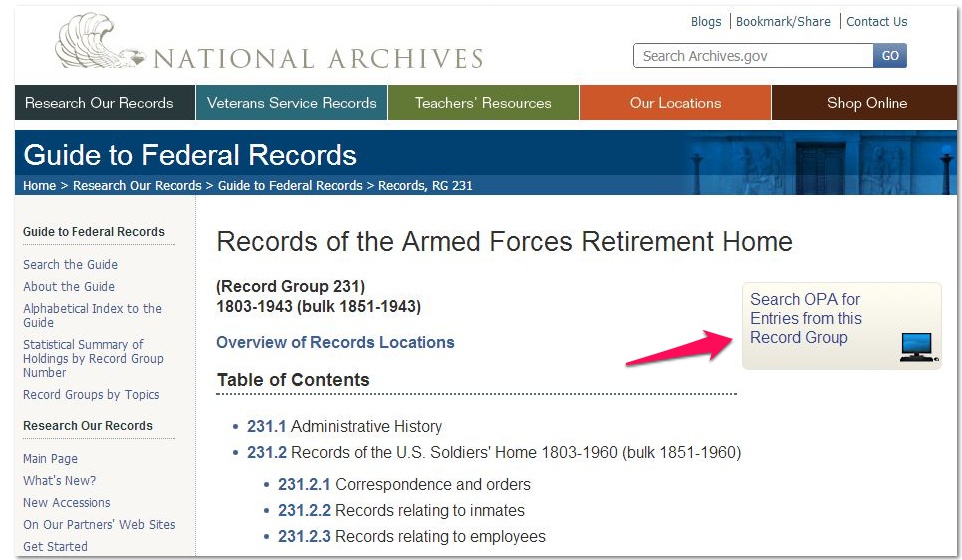
Did you have a veteran ancestor who was a resident of an Armed Forces Retirement Home? Today’s gem is “Records of the Armed Forces Retirement Home, 1803-1943.” Notice the link to search the OPA (Online Public Access) for entries from this record group.
The NARA website gives this summary of the retirement home history: “Established as the Military Asylum, Washington, DC, by an act of March 3, 1851 (9 Stat. 595), with branches (1851-58) in New Orleans, LA, and East Pascagoula (Greenwood’s Island), MS, and at Western Military Asylum, Harrodsburg, KY.”
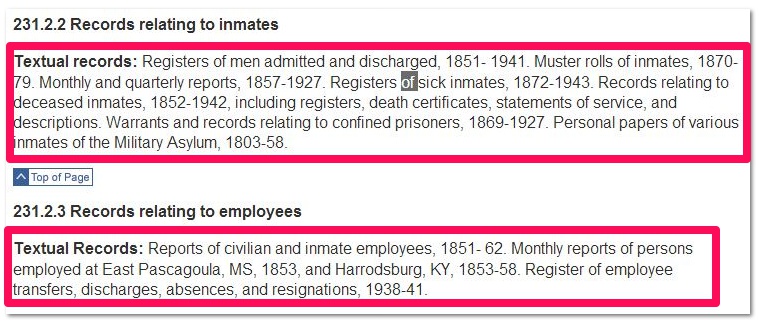
Look at the cool things you can find for both inmates (residents) and employees:
Whenever you find a record group at the National Archives you would like to access, check to see if they have created a finding aid, such as this one:
To obtain copies or view records, use this contact information:
Well there you go! There are plenty more to explore, so stay tuned…and Happy Trails!
I just added handouts/syllabus material for classes I will present at this weekend’s “Ancestor Roundup” in Seaside, California, co-sponsored by the Commodore Sloat Chapter of Daughters of the American Revolution and the Church of Jesus Christ of Latter-Day Saints. I also added syllabus material for a few classes I have taught through the years, and plan to add more as I update them, to make it easier for people to access web links.
Here are details of the conference posted on the local DAR chapter website. Just click on “Ancestor Roundup”. I will be presenting four classes, but I wish I could attend some of the other classes, as there is a great line-up planned. Karen Clifford will be our keynote speaker, and she is always terrific.
My classes will be:
1. Ancestry – Getting Your Money’s Worth
2. 11 Key Record Groups – What’s in Them for You
3. 23 Handy Websites to Bookmark
4. 4 Super Sites for Research Power
If you are unable to attend the conference (it’s on the Monterey Peninsula, California) please feel free to access the handouts and explore the links they contain. They can be found on the menu bar at the top of the blog under “Class Handouts”.
Today I received an email with content updates for Fold3.com, a terrific website I have a subscription to. I have had some success using Fold 3 in my research over the years (it was formerly known as Footnote), and wanted to share this update with you. Although it is a subscription site, some of their content is free. If you want to use the subscription content you can get a trial subscription, or you can visit your local LDS Family History Center which has free access to the site. Fold 3 is unique in that its content is obtained through a partnership with the National Archives, so the digital collections are images of original sources, much of it with primary content.
I include here the email I received from Fold 3 regarding the Fold3 Photographic Collections, and hope it is okay that I copied it in its entirety because I thought it was so informative. I don’t think they will mind me giving them a plug:
“Fold3 is known for its unique collections of military records and historical documents, yet there are a vast number of photographs on the site as well. They are filed within more than a dozen photographic collections, as well as within some of the document collections. The most recent updates to digitized photographs include those from the Civil War and others from within the WWII Navy Muster Rolls.
The Civil War Photos are separate from the Brady Civil War Photos, yet share a common bond through a renowned team of photographers. The main distinction on Fold3 is that they come from different sources. While both sets of photos—with thousands of images in each—were taken by the Mathew Brady team of photographers during the Civil War era, the “Brady Civil War Photos” are from National Archives publication T252, “Mathew Brady Photographs of Civil War-Era Personalities and Scenes,” while the similarly named “Civil War Photos” are from the Library of Congress collection of Civil War Glass Negatives and Related Prints. Although presented under two titles, they both support the rich Civil War Collection and are free to view on Fold3.
If you’re a fan of the WWII Navy Muster Rolls—a new title featured in last month’s content update email and Fold3 Blog post—you may have noticed photographs of ships and personnel distributed within these record images, as well. The photo categories are not included with every ship, so the easiest way to locate them is to type the word “photos” in the search box on the WWII Navy Muster Rolls title page and view the resulting matches. Using the filmstrip at the bottom of the Fold3 viewer, you can browse to see the wide range of offerings for each ship. Examples include a view of the USS Coral Sea underway in 1986, Doolittle raiders aboard the USS Hornet, and Rear Admiral Moffett on the USS Langley.
These photographs are rich in historical content and complement the document images on Fold3. Using them in tandem provides an enhanced perspective of U.S. military history.”
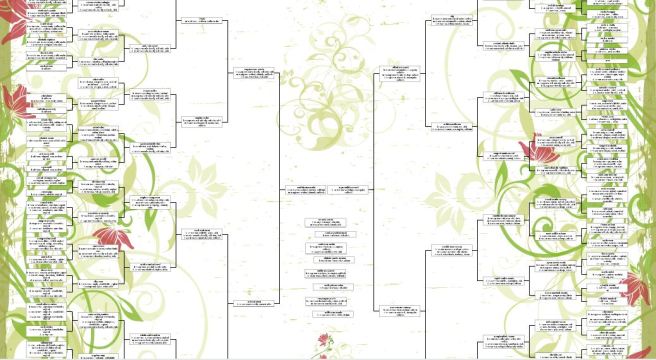
A few weeks ago I needed a gift for the outgoing director of our Family History Center. The Family Chartmasters website came to the rescue with a beautiful “bowtie” pedigree chart. So I am giving them a plug today. A bowtie chart shows the ancestors for a couple, with the husband’s extending to the left and the wife’s extending to the right:
Design your own chart and give a beautiful gift
This is actually a chart I designed myself using their easy “design it yourself option. For the gift I gave, I made a 5 generation chart on 20″ x 24″ presentation paper (archival ink) for $24.95. I added the background from their ample library, added boxes for additional children, and added embellishments and a title. I even could have opted for a background using my own family photograph, like an ancestral church, or a family portrait.
I liked the results so well I made one for myself (that’s the one pictured above). I chose to include 7 generations so I needed to use the 36″ x 48″ paper, but sizes begin at 8.5″ x 11” and depend on the number of generations you include. I also had my pick of paper types, such as presentation paper, photoglossy, parchment, matte canvas, standard bond, and vinyl. The presentation paper suits me fine as I am going to frame it behind glass, but the canvas matte sounds pretty great. This configuration will cost me $49.95, but extra copies will only be $24.98.
If you prefer, they can create a chart for you and will work with you to get it just right. In either case, you will need to provide data for the chart. Do this by uploading a GEDCOM file from your genealogy software, downloading from Familysearch.org, or entering the data manually.
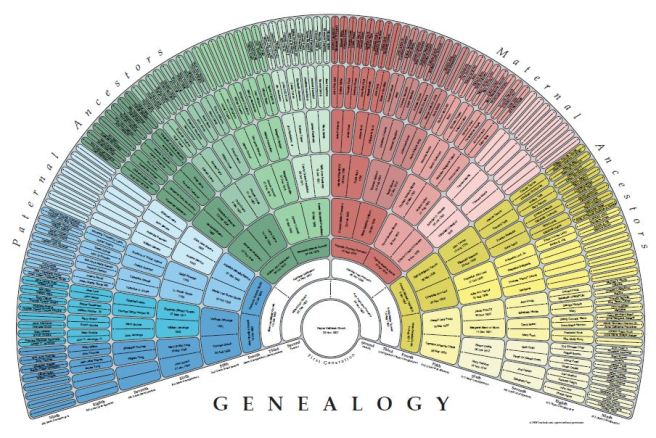
If you have created a family tree on Familysearch.org you can create the world’s fastest fan chart on www.createfan.com. Just log into Createfan using your Familysearch username and password and it will access your “Family Tree” and instantly show you a colorful 9 generation chart, created as a PDF file.
There are links to website partners who will print this chart for you—the least expensive being Family Chartmasters above, who can print it for as low as $6 (20 lb bond, not archival) and as much as $66 (matte canvas, archival quality pigment inks).
Now, you might be wondering just how fast you can get one of these, because you are, um, still trying to think of the perfect gift for your parents, spouse, or children. Good news! You can pay extra for expedited service, and then have it sent Express Mail and, voila, your gift problem is solved. I finished creating my chart on a Thursday night and had it in my mailbox the following Tuesday.
This of course, presumes you have already done the research to know who should go into the chart! Not sure Family Chartmasters will appreciate my plug one week before Christmas, but they shouldn’t have given me such great service!
There are other options for creating quality genealogy charts, such as those in your genealogy software program, but I have not seen any better than Family Chartmasters. Two thumbs up from On Granny’s Trail!
Hey! You! Yes, you! Are you listening? I hope so, but if not you have 24 hours to get it right, because Friday the 23rd is StoryCorps’ National Day of Listening. I only know this because as we were driving down highway 101 for a Thanksgiving getaway we were listening to an NPR interview with Dave Isay, founder of StoryCorps. StoryCorps is an innovative project to record, share, and preserve the oral histories of all kinds of Americans—you, me, anyone.
Since 2003, according to the interview, over 50,000 interviews have been recorded, and since the interviews are done in pairs, this accounts for over 100,000 folks who have been recorded. Here’s how it works: 1) Find someone whose story needs to be told. It might even be you! If your parents or grandparents are still living, this is a priceless opportunity for you, 2) Print out the “Great Questions List.” or use the question generator, 3) Sit down with another person as the interviewer or interviewee, push the “Record” button, and begin asking questions.
There are different options for recording an interview.
1. Use StoryCorps’ do-it-yourself guide to get started.
2. Record an interview directly on your computer, tablet, phone or computer, and upload it to their website. Or you can just save the recording as an audio file and share it with family by burning it to CDs.
3. Visit one of their Story Booths.
4. Rent a storykit to make a recording.
5. Bring StoryCorps to your organization’s event to set up a recording booth.
If you record your story on their equipment or in one of their Story Booths, the interview will be saved at the American Folklife Center at the Library of Congress. Pretty amazing!
I thought it appropriate to learn about StoryCorps on Thanksgiving Day, and know it is not a coincidence they sponsor the National Day of Listening the day after a holiday where families traditionally gather. What a great opportunity to take your mom, dad, or grandparents aside to find out more about their lives. I am grateful I was able to record interviews with my parents and grandparents in their lifetimes, and I am more thankful every passing year I can listen to these precious memories in their own voices.
Do not wait another day to record these oral histories—your own or your loved ones’. It is one of the most important things you can do for future generations.
 The NARA website gives this summary of the retirement home history: “Established as the Military Asylum, Washington, DC, by an act of March 3, 1851 (9 Stat. 595), with branches (1851-58) in New Orleans, LA, and East Pascagoula (Greenwood’s Island), MS, and at Western Military Asylum, Harrodsburg, KY.”
 Whenever you find a record group at the National Archives you would like to access, check to see if they have created a finding aid, such as this one:
 To obtain copies or view records, use this contact information:
 Well there you go! There are plenty more to explore, so stay tuned…and Happy Trails!
 On Granny's Trail